
Does your organisation depend on Microsoft Teams to manage day-to-day communications? If so, you already know that the way an attendant console plugs into Teams can make the difference between smooth, efficient call handling and a frustrating user experience. Receptionists and front-desk staff need a console that works with Teams, not around it. Fast, reliable and designed to reduce complexity, not add to it. With Heedify now certified under the Microsoft Unify integration model, Voitec brings you an attendant console that operates as if it were built natively inside Teams itself.
To understand why Unify is such a leap forward, it’s worth looking at how Microsoft defines the different integration models.
Integration Models for Microsoft Teams
Microsoft defines three certified ways for third-party solutions to integrate with Teams’ voice. Each comes with its own strengths and level of alignment:
- Connect – Built on Direct Routing, this model mirrors a traditional telephony project. It typically means new numbers, added infrastructure, and multiple systems to maintain. While it gets the job done, it can introduce extra complexity and longer rollout times.
- Extend – Using Microsoft Graph APIs, Extend has become the go-to choice for many organisations. It allows the attendant console to live inside Teams, supporting high call volumes and delivering context without constant screen switching. For many businesses, Extend strikes the right balance of functionality and simplicity.
- Unify – The latest and deepest integration, powered by Azure Communication Services (ACS) and the Teams JavaScript SDK. Here, the attendant console takes over as the primary call control surface, eliminating duplicate ringing and providing an experience that feels fully native to Teams.
Why Unify is a Step Forward
- One interface built for call handling – purpose-designed for receptionists and front-line staff.
- Native access to Teams’ voice features – no workarounds.
- Simpler deployments – less complexity to configure, faster time to value.
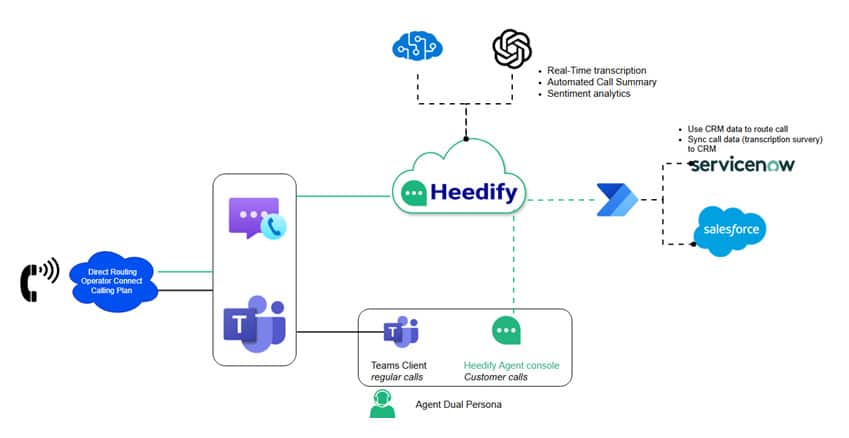
Diagram 1 shows how this looks in practice. Calls flow through Teams’ voice services straight into the Heedify console, with added intelligence layered on top. Features like real-time transcription, AI-driven call summaries, and CRM integration with platforms such as Salesforce and ServiceNow turn every interaction into something smarter and more efficient. For IT, it’s an architecture that’s embedded and future-proof; for end users, it simply works the way it should.
The Advantage for IT and End Users
By being certified under both Extend and Unify, Heedify gives IT teams options. You can decide which model best fits your organisation’s current setup, knowing that whichever path you choose, you’re aligned with Microsoft’s future direction. This flexibility means less risk in deployment and greater confidence in long-term support.
For receptionists and front-desk staff, the benefit is immediate: a console that feels natural to use. Instead of wrestling with ringing conflicts or juggling multiple windows, they get a tool that helps them focus on the caller, respond faster, and deliver a smoother experience for everyone on the other end of the line.
What You Can Expect
Partnering with Voitec, you gain access to Heedify’s Microsoft-certified attendant console, supported locally with expert guidance. Whether leveraging the trusted Extend model or adopting the advanced Unify integration, Voitec ensures customers benefit from a solution that is scalable, compliant and optimised for your Microsoft Teams.
The Heedify Attendant Console is unifying the experience for your organisation.